Describe your business.
Get a complete brand.
In under a minute.
AURA is a brand identity engine powered by Gemini 2.5 Flash. Enter six fields about your business — name, type, location, atmosphere, audience, differentiator — and the AI runs a two-stage pipeline: first defining brand strategy and voice, then translating that into a visual identity. The result is a complete brand: colour palette, typography pairing, brand voice, hero copy, and market positioning. The generated brand then applies itself to the UI in real time, transforming the shell that produced it into a live preview of the identity it created.
- Next.js 16
- TypeScript
- Gemini 2.5 Flash
- CSS Custom Properties
- View Transitions API
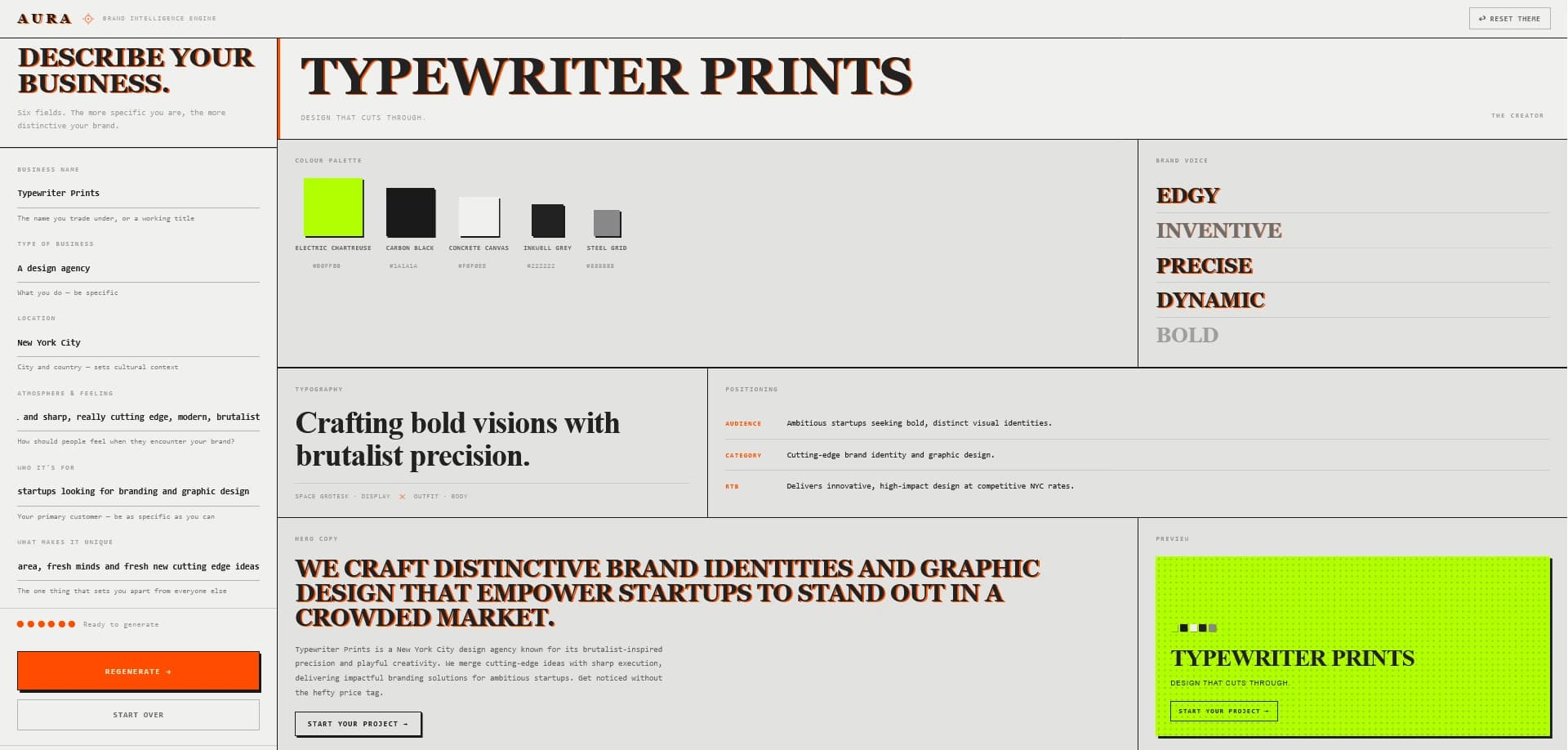
The Interface Is the Output
Most AI tools show you a result. AURA becomes the result.
The central design decision in AURA is that the UI doesn't just display the generated brand — it wears it. When Gemini returns a palette, the page background, text colours, borders, fonts, and buttons all update in real time via CSS custom properties. The tool that generated the brand becomes a live demonstration of it. A boutique perfumery brief produces a warm parchment shell with verdigris accents and Cormorant Garamond. A punk street food stall produces something entirely different. The same interface, an infinite range of outputs.
This created a specific design constraint: the application chrome had to remain legible and functional regardless of what colour palette the AI chose. The solution was a split token system. A set of shell tokens defined at the :root level are never overridden by brand application — the header, the generate button, and the wordmark mark retain their identity beneath whatever brand is being displayed. The generated brand owns the board; the shell owns the frame.
The board layout is a deliberate editorial decision. Six cells arranged in a 3-column grid — palette, voice, typography, positioning, hero copy, colour atmosphere. Each cell is a complete, self-contained piece of information. A small business owner reading the board doesn't need to understand what "positioning" means as a discipline — they read "Audience: Compassionate families and animal welfare advocates" and immediately recognise their customer. The board is designed to be understood by the person the brand is for, not just the person who commissioned it.
The colour atmosphere cell in the bottom-right is a live canvas field — a generative background rendered in real time from the brand's actual palette hues. It doesn't use the generated colours as a static swatch; it derives hue angles from each palette role, skipping achromatic colours that would otherwise default to red, and renders them as a flowing light field that breathes with the brand's chromatic character. A near-monochrome brutalist palette produces a different field to a saturated botanical one. The output is always specific.
Two typographic systems run in parallel. Inter handles all chrome: labels, inputs, navigation, buttons — precise, neutral, tool-like. Fraunces, a variable optical-size serif, handles all brand output: the brand name, voice words, hero quote, type specimen — editorial, considered, weighted with history. The contrast between them is the contrast between the tool and what it makes.
Technical implementation follows ↓
Technical Stack
Every layer of the system was built to serve one goal: a brand that feels alive the moment it generates.
| Framework | Next.js 16 — App Router The generation endpoint lives in a Next.js API route, keeping the Gemini API key server-side. The client never touches the key. The route validates the request, builds the prompt, calls Gemini, parses and validates the JSON response, and returns a typed BrandOutput — or a fallback brand if the API is unavailable. |
| AI Model | Gemini 2.5 Flash Generation runs in two sequential API calls. The first builds brand strategy — voice, positioning, copy, and a written brief for the art director — without making any visual decisions. The second receives that strategy and derives palette and typography from it. Each call goes through a model chain (2.5 Flash → 2.0 Flash → 1.5 Flash) with exponential backoff, falling back to a curated example brand if all models are unavailable. |
| Theming | CSS Custom Properties + applyBrand.ts A single applyBrand.ts function maps the AI's palette roles to CSS custom properties on :root. It calculates background depth (bg-page, bg-surface, bg-raised), enforces WCAG AA contrast for all text/background combinations, and derives border colours and hover states from the palette — all at runtime, with light and dark mode variants computed from the same palette roles without a separate theme definition. |
| Transitions | View Transitions API Mode toggles, brand application, and board state changes use document.startViewTransition( ) for smooth cross-fade animations. The board has its own named transition (view-transition-name: brand-board) so it slides up independently of the page chrome. Degrades gracefully in unsupported browsers. |
| Type System | TypeScript + brand.ts A single types/brand.ts file defines BrandOutput, PaletteColor, TypographyPairing, and GenerationStatus. The AI's JSON response is cast to BrandOutput at the API boundary — every component downstream receives fully typed data. Palette roles are a discriminated union; passing an invalid role is a compile error. |
Breaking the AI's Aesthetic Defaults
The hardest engineering problems in AURA were the prompt and the architecture behind it.
Left to its own defaults, Gemini produced dark, atmospheric, editorial brands for every brief — an animal sanctuary, a surf school, a Copenhagen ice cream parlour all came back in deep charcoal with muted earth tones. The model had learned that "high quality brand identity" meant moody, because that dominates its training data.
The fix was architectural. The original single-prompt approach asked Gemini to make strategic and visual decisions simultaneously — the same call that wrote the tagline also chose the typeface. The result was that visual choices were pattern-matched directly from input keywords rather than derived from a considered position. The rewrite splits generation into two sequential calls: the first produces only strategy (voice words, copy, positioning, a brief for the art director); the second receives that strategy and produces only visual identity. Voice words are now constrained by a banned-word list that excludes "innovative", "bold", "dynamic" and twenty other defaults. The specimen text is briefed as something you'd find on the inside of the packaging — not a tagline, not a description. Small constraints, measurably different outputs.
Contrast enforcement runs client-side in applyBrand.ts, independently of the AI. Even if Gemini returns a palette where the text colour fails WCAG AA against the background, the function catches it and substitutes a guaranteed-legible value. The UI is never broken by a bad generation.
// applyBrand.ts — contrast enforcement before any token is set

function enforceContrast(textHex: string, bgHex: string): string {
  const ratio = getContrastRatio(textHex, bgHex)
  if (ratio >= 4.5) return textHex

  // AI's choice fails WCAG AA — substitute guaranteed value
  const bgLuminance = getLuminance(bgHex)
  return bgLuminance < 0.35 ? '#f5f5f5' : '#111111'
}